Legal & privacy
AI Act chatbot disclosure: what Art. 50 asks
Since 2 August 2026 the AI Act requires chatbots to disclose that they are AI. What website owners should do: roles, a practical checklist, penalties.
Contents
Article 50 of the EU AI Act has applied since 2 August 2026. For every chatbot on a website, that means visitors have to be told they are talking to an AI, not a person. AI Act chatbot disclosure sounds like a compliance project, but in practice it is fairly contained. This article covers who the rule applies to, what you as a website owner should actually do, and how we handle it in the Mignuti widget.
Not legal advice. This article explains the legal position in general terms, as we understand it (as of October 2026). It is no substitute for advice from a lawyer on your specific situation.
What the AI Act says about chatbot disclosure
The AI Act is Regulation (EU) 2024/1689. Two paragraphs of Article 50 matter most for chatbots:
- Paragraph 1: AI systems intended to interact directly with people must be designed so that those people are informed they are interacting with an AI system. The exception: when this is obvious to a reasonably well-informed, observant person.
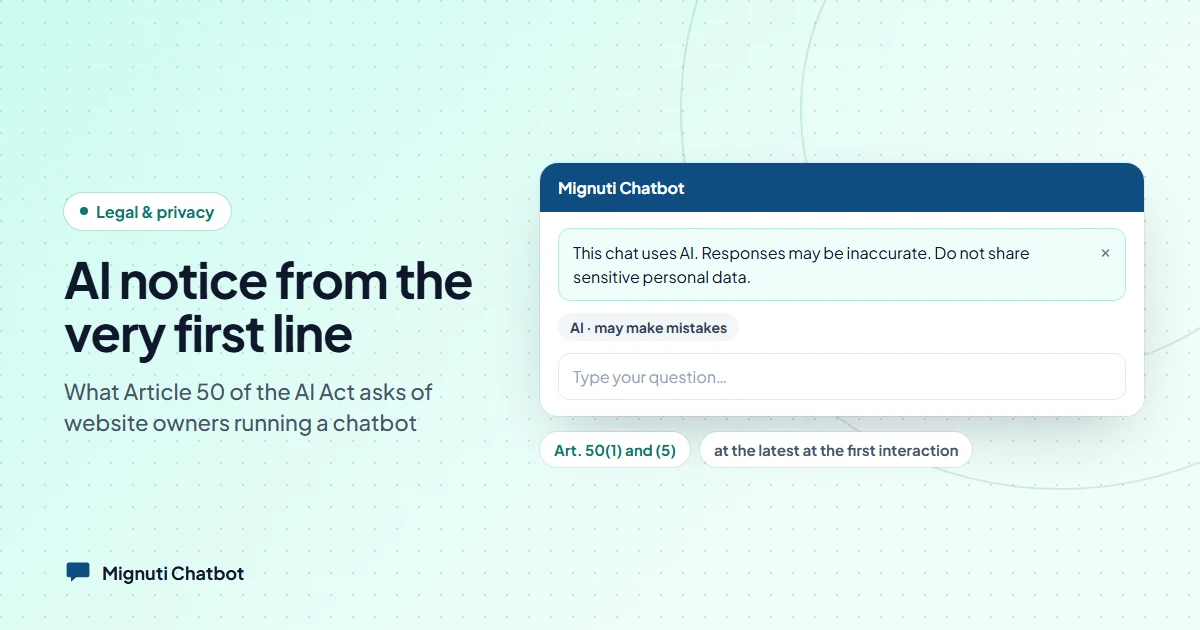
- Paragraph 5: That information must be given in a “clear and distinguishable manner”, at the latest at the time of the first interaction, and it must be accessible.
Paragraph 2 is about something else: providers of generative AI have to mark its output, including text, as AI-generated in a machine-readable format. That is a technical duty of the provider, not of you as the website owner. Paragraph 4 does address deployers, but only for deepfakes and AI-generated text published to inform the public on matters of public interest. A customer service chat usually isn’t that.
One tip up front: don’t rely on the “obvious” exception. Whether something was obvious is hard to prove after the fact. A visible notice costs you nothing.
Provider or deployer: which one are you?
The regulation distinguishes two roles (Art. 3(3) and 3(4)):
- The provider develops an AI system, or has it developed, and places it on the market under its own name.
- The deployer uses an AI system under its own authority.
If you embed a ready-made chat widget from a vendor on your website, you are almost always the deployer. By its wording, the duty in paragraph 1 falls on the provider, the company that builds the chatbot. Does that mean it’s none of your business? Not quite. The notice appears on your website, in front of your customers. If you hide it, switch it off or cover it up, you have created a problem you can’t simply hand back to the vendor.
One case is unclear: if you offer a chatbot entirely under your own brand (white-label), you might end up in the provider role yourself. The regulation only spells out such role changes for high-risk systems. If you pass a bot on to your own clients under your name, as an agency for example, get that checked.
A checklist for website owners
You can work through this in about fifteen minutes:
- Notice visible at first contact. Open your chat widget as a visitor would. Is the AI notice there before the first message is written?
- Not hidden. No tiny grey text, no notice that only appears after a click, nothing your own CSS covers up.
- Not only in the terms or the footer. A line in your terms and conditions or at the very bottom of the page does not reach anyone “at the time of the first interaction”. It can add to the notice, not replace it.
- Accessible. The notice has to work with a screen reader, with a keyboard and when zoomed in. Sufficient contrast is part of that.
- Don’t brand it away. If you restyle the widget or remove the vendor’s logo, the AI notice stays.
- Check your contract with the vendor. Does it say the vendor provides the disclosure, and what you must not change? Also ask how the vendor deals with machine-readable marking under paragraph 2.
- AI literacy for your team. Article 4 requires providers and deployers to take measures to promote the AI literacy of their staff. For a website chatbot, that can be modest: whoever reads the conversations should know the bot can be wrong, how to check answers, and where to correct a wrong one.
- Document it. A screenshot of the widget showing the notice, the date, the contract, and a short note on the training you did. That way you can show what you did if anyone asks.
What are the penalties?
Soberly put: Art. 99(4) allows fines for breaches of, among others, Article 50 of up to 15 million euros or 3 per cent of worldwide annual turnover, whichever is higher. For SMEs and start-ups, paragraph 6 applies the lower of the two. These are ceilings, not standard fines.
In Germany, according to the Federal Ministry for Digital Affairs, the Bundesnetzagentur is the central market surveillance authority and runs an AI service desk for questions. The European Commission has also published guidelines on the transparency obligations that help with interpretation.
The AI omnibus: what changed and what didn’t
In July 2026 the EU adjusted parts of the AI Act with Regulation (EU) 2026/1744, in force since 27 July 2026. For website chatbots, this is what matters:
- Unchanged: Art. 50(1) and (5). The disclosure duty for chatbots has applied as planned since 2 August 2026.
- New: a four-month transition period for machine-readable marking under paragraph 2, for generative systems placed on the market before 2 August 2026, so until 2 December 2026. That concerns providers.
- Changed: Art. 4 on AI literacy. It now asks for measures to promote AI literacy rather than a guaranteed level.
- Postponed: the obligations for high-risk systems. An ordinary customer service bot is not a high-risk system.
In short: the omnibus buys time for high-risk AI and for technical marking. The visible notice in the chat is not affected.
How Mignuti Chatbot handles the disclosure
Every Mignuti widget shows an AI notice as soon as the chat window appears, before the first question is asked. In English it reads: “This chat uses AI. Responses may be inaccurate. Do not share sensitive personal data.” The notice appears in the widget’s language, and the widget speaks ten languages.
Visitors can collapse the long sentence. It doesn’t disappear, though: it shrinks to a short, permanent marker, “AI · may make mistakes”. The widget remembers that choice per visitor. The notice cannot be hidden entirely.
For screen readers, the notice is linked to the chat window and to the input field. Because focus moves straight into the input field when the chat opens, common screen readers read the AI notice together with the field instead of skipping it.
As a customer, you can’t switch the notice off, on any plan. Not when you remove the “Powered by” badge on the Pro plan, and not with white-label on the Enterprise plan. On top of that, our terms state that the notice must not be altered, hidden, overridden with CSS or disabled. That answers item 6 of the checklist for our widget.
Machine-readable marking under paragraph 2 is, as described above, a provider duty and not yours. With us, every answer whose text comes from the AI model carries the marker data-ai-generated="true" in the widget and a matching field in the database, the API and the export. Fixed texts such as “I don’t have information on that” are deliberately not marked as AI-generated.
You’ll find our AI Act transparency statement under AI disclosure, and everything on privacy and security on our trust page.
What we can’t do for you
To be honest: a widget can show the notice, but it can’t train your team. The AI literacy measures under Article 4 and your documentation stay with you. And if you use the bot for anything beyond customer service and website questions, such as decisions about people, quite different rules may apply. Then a legal review is worth it.
For the typical case, a bot that answers questions about your products, services and opening hours, it comes down to this: leave the notice visible, brief your team, file a screenshot. If you’re looking for a chatbot with the first part already built in, you can try Mignuti Chatbot free for seven days.
Your own chatbot, built from your content
Add your website, upload PDFs or connect a folder. The bot answers only from your sources. Try it free for 7 days.